Product Design Process Investigation
Intending
I am going to try to make different model or forms of keyboard, each having their own functionality and designs. All of the designs will have their positives and negatives to their build, but the variation in the build will create different feels in the keyboard. For instance, when the key are in different places, it will create a different light scene, and maybe a different color pattern.


Defining the Problem or Subject
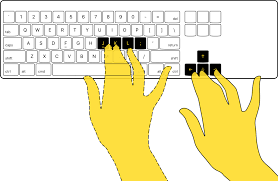
When I am at home, I spent some time on my computer and use the keyboard quite a bit. The more I use a keyboard, the more you come to know some problems or quirks about it. When typing, I use the arrows keys a lot, but they are in an inconvenient place for me. On regular keyboards, they are out of an easy reach of the human hand, so then I have to constantly look down at the keyboard. Even though this may seem like a small problem, but overall can become an annoyance, and cumulate to more wasted time. This also relate to the keyboard on a laptop. Take a mac computer for example, the arrow keys in my opinion are very small. In addition to being very small, the up and down arrow keys are very tight together, so when I try to press on one of them, my finger hits the other one. This is also very troublesome because the keys are almost so small that my finger tips are bigger than keys I'm pressing down on. This is just one small problem, that will be factor in changing the design of the keyboard. So one of the designs may incorporate the arrow key somewhere else that may be more convenient for the user, and that they may be used more often.
Exploring the Problem or Subject
Arrow Keys
Taking the example from before, where the arrow keys are too small and are in an awkward location. This will affect the thought process that goes into creating some of the keyboard designs. For instance, instead of placing the arrow keys to the lower right part of a desktop keyboard, I could have them placed below the space key. I know this may sound weird at first, possibly making the keyboard look a little funky. However, I think that it would be a suitable place because it would utilize the thumbs, instead of constantly hitting the space bar and virtually nothing else. Due to the arrow keys being below the space bar, you wouldn't have to move your hands at all, but just move your thumbs below the space bar. They would be in a 2 by 2 grid, where the left and right arrow keys would be the first row of two. Then below that, would be the up and down arrow keys on the second row. You can look at the reference image below, that I took a rough sketch of, and though it may look weird, will give a better place for the arrow keys.
a picture of the sketchbook goes here --- don't forget
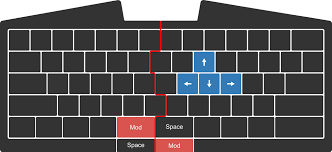
Another example would be putting the arrow keys somewhere within the alphabet part of the keyboard. In the example below, you can see that the arrow keys are already where you normal finger placement would be at. This would be a great placement, but the part that would be compromised would be the placement of another key. In the example below, they choose to split the space key in half, however, I think that you could just add another key below the space bar. I do believe that it would make the keyboard look weird, so I will continue to think of how to make the keyboard have this nice functionality while also maintaining its well kept design.

 I always have like the view of 60% or 65% keyboards, where it attempts to bring the keyboard into its most important components. I think some of the reason that I like these type of keyboard is that it tries to bring everything within fingers reach. It brings about a new style of keyboards, that eliminates what may be extraneous to a person's preference. This brings plenty of bonuses to a person who wants to get rid of the whole right side of the typical desktop keyboard, but brings some challenges and cons to the situation. The positives is that the keyboard is within the person's reach and they will never reach have to move their hands, other than to grab the mouse. Another positives is that it will give the person more room on the desk for other things, more mouse space or a place to put a coffee cup. Some of the negatives are that they start to become confusing with trying to jam all of the functionality of a regular keyboard into something that is 40% smaller. An obvious negative would be that you are cutting off explicit keys that the user is used to using. This may relate back to the previous negative, in where they may become confused with using the new style of the keyboard. It will be transition that may be hard for some people, because they liked having the extra explicit keys that the larger version keyboard had. However, the person could just avoid the problem completely by just sticking with a 100% keyboard instead. Even so, I believe that 60% keyboards, if they can become better structured, they will become a better keyboard for everyone. Now, a 60% keyboard differs in the design of a laptop keyboard, because they do not typically have arrow keys. 65% keyboards probably will.
a picture of the sketchbook goes here --- don't forget
Another example would be putting the arrow keys somewhere within the alphabet part of the keyboard. In the example below, you can see that the arrow keys are already where you normal finger placement would be at. This would be a great placement, but the part that would be compromised would be the placement of another key. In the example below, they choose to split the space key in half, however, I think that you could just add another key below the space bar. I do believe that it would make the keyboard look weird, so I will continue to think of how to make the keyboard have this nice functionality while also maintaining its well kept design.
Minimalist Keyboard
I always have like the view of 60% or 65% keyboards, where it attempts to bring the keyboard into its most important components. I think some of the reason that I like these type of keyboard is that it tries to bring everything within fingers reach. It brings about a new style of keyboards, that eliminates what may be extraneous to a person's preference. This brings plenty of bonuses to a person who wants to get rid of the whole right side of the typical desktop keyboard, but brings some challenges and cons to the situation. The positives is that the keyboard is within the person's reach and they will never reach have to move their hands, other than to grab the mouse. Another positives is that it will give the person more room on the desk for other things, more mouse space or a place to put a coffee cup. Some of the negatives are that they start to become confusing with trying to jam all of the functionality of a regular keyboard into something that is 40% smaller. An obvious negative would be that you are cutting off explicit keys that the user is used to using. This may relate back to the previous negative, in where they may become confused with using the new style of the keyboard. It will be transition that may be hard for some people, because they liked having the extra explicit keys that the larger version keyboard had. However, the person could just avoid the problem completely by just sticking with a 100% keyboard instead. Even so, I believe that 60% keyboards, if they can become better structured, they will become a better keyboard for everyone. Now, a 60% keyboard differs in the design of a laptop keyboard, because they do not typically have arrow keys. 65% keyboards probably will.Planning What to Do
Arrow Keys
All in all I think that the arrow keys can find a better location on the keyboard in contrast of where it currently is. In addition to the arrows keys, with the possibilities of adding keys below the space bar, I will have to find a way that it will add to the functionality of the keyboard, but also maintain that nice look to it. Adding keys below the space should not pose a problem to the user when they are typing, because it will be placed between their hands. So, the only thing that I have to focus on is making where the keys will fit nicely within the design of the keyboard.Minimalist Keyboard
With the minimalist keyboard, I plan to create a keyboard that will utilize the limited space as efficiently as possible. It will also incorporate some of the ideas above, with the arrow keys, where they may be placed below the space bar. My goal will be to compact a keyboard in way that it has all of the functionality and capability as a 100% keyboard, without becoming too complex for someone to transition over to.Lighting on Keyboard
This is going to be different for every keyboard, because the lighting on the keyboard is something that is so customizable. There are almost an unlimited amount of combinations and patterns that could make up the lighting design of a keyboard. That said, there would be ugly combinations, so for each keyboard, I want to test different color patterns. Then I want to check the effect it has on the actual design of the keyboard. To see if it changes the feel of the keyboard, and changes the sense of the shape of the keyboard.


No comments:
Post a Comment