Marking Period 1 Progression
Intention, Definition, and Exploration of Ideas:
 My intention is create and apply these ideas that I brainstorm from my mind and bring it to reality. I want to try to make things more efficient in its design, to make a user's experience as best as it can possibly be. I was brainstorming what type of designs that I should create. First design that I thought of was the keyboard design would be a typical keyboard, but I would make each component that make up a keyboard, I would start my design of the keyboard. I would change the styles of the keyboard to different variations, and show each of them. With each design, I will animation the keyboard coming together, component by component. The next design that I started brainstorming was a tablet design. The tablet design will have the screen size of a typical piece of paper, and with a small border surrounding the screen. On the back of the tablet, there will be a simple keyboard design attached to the back. The keyboard will come out in a way that it will almost give the impression that it was a laptop to start out with. I kept thinking and brainstorming about these ideas, trying to come up with more designs for each one.
Planning:
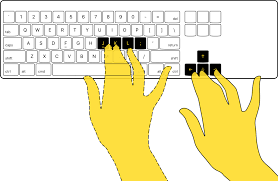 I had to make a choice between the two concepts. So I went with they keyboard design, because it had more variety in what the design could be like. I started making expanding on my current ideas and plans that I have already thought up. I first defined what it was that I wanted to base my designs on and what I should focus on when making up these designs. It is to make different models or forms of keyboard, each having their own functionalities and designs. All of the designs will have their positives and negatives to their build, but the variation in the build will create different feels in the keyboard. Another part that I wanted to focus on is that to make it as efficient as possible, in way that the keyboard will be uncomfortable to use. I started with the arrows keys on the keyboard, because I like to use them, but they are in an awkward spot. I don't like how someone must adjust their right hand to always tap an arrow key. So, I started thinking of what could possibly be a better spot. The first spot that came to mind was that the arrow keys could be right below the space bar. I thought that this would not pose any problems because it is "empty space" meaning that its space not being occupied by anything. It would also give your thumbs more of a role to play when typing, because then all you would have to do is reach down and hit an arrow key.
 Moving on from the arrow keys, I started to focus on 60% keyboards, in how they were trying to make a keyboard as compact as possible. I like this idea because it trying to bring another design that may seem more efficient to certain people, and that it bring another challenge to a design that could possibly benefit it in some way. It attempts to bring all of its most important components together and remove the extraneous. I want to start making some of these designs because it will make me think on how it will improve the experience of a computer user. I also like the design of these because they look very slim and do not take nearly the same amount of space as a full size keyboard.
Producing:
As seen earlier in the blog, I already showed some of my thoughts with the design involving a new location for the arrow keys. So I started thinking of some designs for the keyboards that I have in mind, where they would each have their own pros and cons. Some will have their own feature, while some of the designs will be a combination of the other keyboard designs.
These are two alike designs, where they utilize the arrows below the space bar. Though this design may look very weird, it may bring more comfort to someone who constantly uses the arrow keys.
This design is where the arrow keys are in a square shape, this may be uncomfortable but that will have to come with some testing and actually try the keyboard design out.


These are two alike designs, where they utilize the arrows below the space bar. Though this design may look very weird, it may bring more comfort to someone who constantly uses the arrow keys.
This design is where the arrow keys are in a square shape, this may be uncomfortable but that will have to come with some testing and actually try the keyboard design out.

This design is where the arrow keys are in a straight line, where this may be more comfortable to some other people instead of the others.

These are just one type of design that I have, and I am still working on more. I am also still learning this simple interface as well, and it is really nice for making simple blueprints.
Evaluating:
 I have not completed any views other than the top, because my main thought process was that the top would give the best layout. So, only focusing on the top view, I set up multiple different designs, each having some benefits and most likely having some downfalls. Looking at the designs with the different placement of the arrow keys, that could something that could programmable by the user of the keyboard. Then the keyboard keys will be able to come off and they will be able to move them around to what would please them the most. I'm only designing the 60% keyboards and making blueprints for them currently. Right now, I need to think of how other people are going to feel about transitioning to something new to this, and how willing they will be to transition over to it. Another thing that my blueprint do not focus on is the coloring of the keyboard, I can add coloring to the keyboard, but right now I want to focus on the layout of the keyboard.
Integrating:
 Right now I am still in the progress of making more blueprints for my thoughts and designs to improving the current design of keyboard. Even though that there probably won't be major difference, it will be the small differences that will overall make the user's experience better. Once I feel that I have made enough blueprints, I will start in blender and make the 3D models of them. Once completing the 3D models of the blueprints, I will then move on to the lighting of the keyboard, and test different type of light styles for each keyboard. I plan for each keyboard to have different type of lighting and hopefully each have their own animation of lighting. If it becomes too much, then I will have some of the keyboards have the same type of lighting and animation. Then, I'll finally moving animation of the keyboard coming together and do this will all of the keyboards. Some will most likely have the same animation coming together. However this is where it really make the keyboard feel like it's being completed and one of the best opportunities to show that they are different.


No comments:
Post a Comment